


Baritastic - Bariatric Tracker
4.613.44K Reviews
App Specs
- Version
- 5.1.0
- Updated On
- License
- Free
- Downloads
- 500,000+
- Developer
- BariApps
- Categories
- Medical
- Platform
- Android
Screenshots
 Analysis by AppCompare
For someone preparing for bariatric surgery, the hard part is often not learning that food, fluids, and follow-up matter; it is keeping useful notes while life carries on. After surgery, that routine can become even more specific. I find Baritastic - Bariatric Tracker most useful as a place to organize that daily work, rather than as a substitute for a care team or a source of medical decisions. It is a free medical app from BariApps, and its focus is firmly on the changing routines around bariatric care.
A realistic day shows where a tracker can help. You may be trying to remember what you ate, whether you drank enough, when you took a vitamin, and what you want to ask at a follow-up appointment. Instead of relying on memory at the end of the day, you can record items as they happen and review the pattern later. That small shift—from reconstructing a day to keeping a running record—is the practical value I look for in an app like this.
Starting with a routine, not a perfect record
I would begin by deciding what I actually need to track at my current stage. Someone preparing for surgery may care most about building consistent habits and keeping questions organized; someone recovering may have a different set of daily priorities. Baritastic is designed around bariatric surgery, including gastric bypass, sleeve, lap band, and balloon procedures, so its purpose is more focused than a general calorie counter. That focus can make the app feel relevant, but it does not mean every person will need every tool every day.
The best approach is to make the first few days easy. I would choose a manageable set of entries—perhaps meals and fluids first, then add other tracking only if it helps. Trying to record every detail from day one can turn a helpful routine into a chore. A tracker is only useful when the effort of logging is small enough that you keep doing it, especially on busy or uncomfortable days.
Following entries through an ordinary day
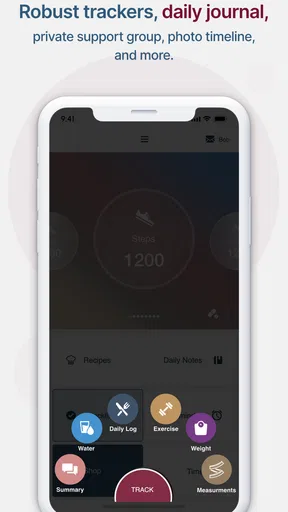
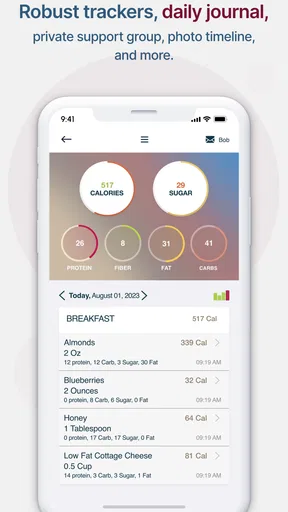
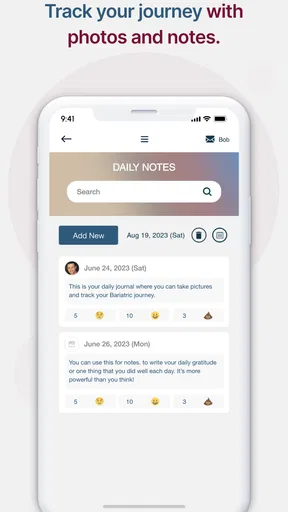
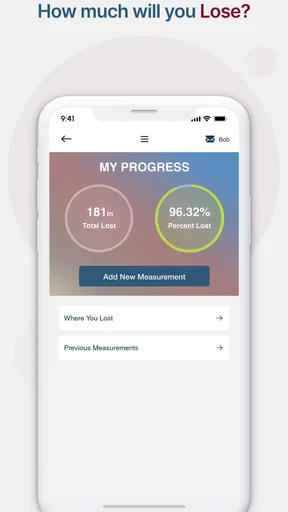
In practical use, meal, water, exercise, weight, and measurement tracking gives the day a few different checkpoints. Meal logging can help you notice what you are actually managing to eat, while fluid entries can make a gradual hydration goal easier to remember. Weight and measurements serve a different purpose: they let you keep a record over time rather than judge progress from one isolated morning. I would treat each entry as a note for context, not as a scorecard.
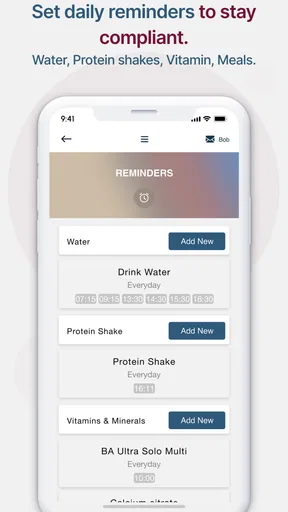
Reminders can help with tasks that are easy to lose track of when your schedule changes. I would set only the prompts that solve a real problem—such as a vitamin reminder—rather than turning every possible activity into an alert. Too many notifications can become background noise, and then the reminders stop helping. A useful setup is one you can follow without feeling that the app is scolding you.
There is also a worthwhile workflow tip: log close to the moment, then review briefly later. If you wait until bedtime to remember meals and fluids, small details are easy to miss. A quick evening glance can help you spot an incomplete entry or prepare a question for your clinician, but it should not become an invitation to draw medical conclusions from a single day. For symptoms or concerns, the right handoff is to your care team.
Worth Reading Before You Choose

EA SPORTS FC Mobile 26 Is a Bigger Football Game, but It Takes Time

Flipboard Shows What News Apps Must Do Beyond the Feed

Switching to Android Auto Means Rethinking Your Driving Routine

Google Calendar Makes a Crowded Week Easier to Manage

Ludo King Makes the Most of the Minutes Between Plans

Baby Panda World Brings Quick Play to Modern Phones, but Its Game Library Feels Busy
Turning a personal log into a useful handoff
The strongest reason to keep a consistent record is that it can give you a clearer account of your routine when you speak with your care team. Rather than saying “I think I drank less this week,” you can look back at what you noted and describe the pattern more concretely. That does not make the app a clinical record or guarantee that every entry is complete; it simply gives you a better starting point for a conversation.
Community groups and educational material can serve a different handoff: from private tracking to learning how other people handle the emotional and practical parts of bariatric life. I appreciate that this can make the experience feel less solitary. At the same time, peer experiences are not personalized medical advice. I would use group discussions for encouragement and questions to explore, then check treatment decisions with a qualified professional.
Baritastic has an average rating of 4.7 from around 26,000 ratings, and it has been installed over 500,000 times. Those figures suggest that many people find a dedicated bariatric tracker worth trying, though popularity cannot tell you whether its workflow fits your own habits. It is rated for Everyone, and the current version is 2.3.0; it runs on Android 8.0 or later. The app first appeared on September 4, 2014, so it has been around long enough to become a familiar option in this particular niche.
Where the routine can break down
The main trade-off is the effort of keeping a log. If you already use a food diary, a paper notebook, or another health app consistently, moving everything to a new place may create duplicate work rather than clarity. A broad health tracker may be a better fit if you want one general dashboard for many unrelated health goals. Baritastic makes more sense when bariatric routines are the reason you want to track in the first place.
I would also avoid treating any tracker’s numbers or reminders as instructions about what you personally should eat, drink, or do. Recovery plans and nutrition guidance can differ, and an app cannot replace advice tailored to your procedure and health. If logging starts to feel stressful, or if repeated weighing makes you focus on short-term changes, it is reasonable to simplify what you record or pause a feature and discuss the concern with your care team.
Using Baritastic in the middle of a real day
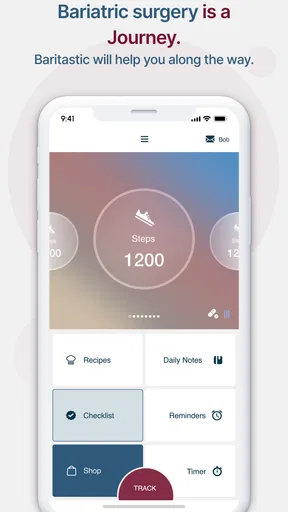
When you first open the app, it greets you with a user-friendly interface that’s both welcoming and intuitive. You won't find yourself lost in a sea of confusing options, which is a relief. The app has a clean design, with everything laid out in a way that makes sense for newbies and veterans alike.
One thing that stands out right away is the customization options. Whether you're pre-op or post-op, the app tailors its features to fit your current stage. This personalized touch really sets it apart from other health apps that tend to be more generic.
Tracking Made Easy
Let’s talk about the tracking features. This app is like having a personal assistant in your pocket. From tracking your meals, water intake, and exercise to monitoring your weight and measurements, Baritastic covers all the bases. The meal tracker is particularly detailed, allowing you to input everything you eat with ease. It even provides nutritional information, which is crucial for those of us who need to keep a close eye on our intake.
What I love is the daily reminders. You can set alerts for meal times, water intake, and even when it's time to take your vitamins. It's like having a little nudge throughout the day, keeping you on track without being intrusive.
Community Support
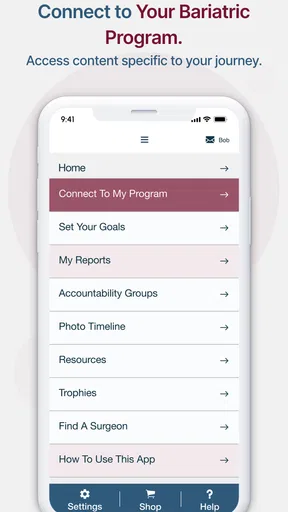
Another standout feature is the community aspect. You can join various support groups directly through the app. This is a great feature for anyone who might feel isolated on their journey. Sharing experiences, tips, and even setbacks with others who understand can be incredibly motivating.
The app also offers access to a wealth of resources, including recipes, tips from professionals, and articles that cover everything from pre-op preparation to long-term maintenance. It’s like having a library of bariatric knowledge at your fingertips!
Integration and Accessibility
One of the things that caught my eye was how well Baritastic integrates with other health apps and devices. You can sync it with your Fitbit, Apple Health, and more. This means all your health data is in one place, providing a comprehensive view of your progress.
Accessibility is also a key feature. The app is available on both Android and iOS, making it accessible to a wide range of users. Plus, it’s free, which is a huge bonus. There are some in-app purchases, but the free version is robust enough for most users.
Final Thoughts
Overall, Baritastic - Bariatric Tracker is a fantastic tool for anyone navigating the bariatric journey. Its blend of functionality, ease of use, and community support makes it a top contender in the health app space. Whether you're just starting out or are well into your post-op life, this app has something to offer.
If you're looking for a reliable companion to help manage your bariatric lifestyle, Baritastic is definitely worth a download. It's like having a team of experts and a support group in your pocket. Give it a try and you might just find it to be the game-changer you’ve been searching for.
Choosing it for the right reasons
For a quick decision, I would ask whether bariatric tracking is the main job I want my phone to do. If yes, the app’s procedure-specific focus, logging, reminders, and community resources make a more natural fit than adapting a general wellness diary. If my needs are limited to a simple grocery list or occasional weight note, a paper notebook or a basic tracker may be less work. The app is most compelling when I expect to return to it throughout a changing care routine.
One practical question is whether I need to enter everything. I would not. A useful record can be selective: capture the details that help you notice a pattern or explain a concern, and leave out entries that add no value. Another question is whether to use the community for medical answers. I would not rely on it for that; peers can share perspective, while a clinician should guide personal decisions. And if a phone-based routine does not suit you, the same habit of keeping notes can be done on paper and brought to appointments.
My overall recommendation is for people who want a dedicated companion for the organization side of bariatric care and are comfortable maintaining a small daily log. I would skip it if tracking itself tends to increase stress, if I already have a dependable system that covers the same tasks, or if I am looking for diagnosis or treatment guidance. Used with realistic expectations, it can help turn scattered recollections into a more useful routine—and make conversations with the people supporting your care easier to prepare for.
Pros
- User-friendly interface for easy navigation.
- Comprehensive tracking of meals and exercises.
- Integration with health devices for data sync.
- Customizable reminders for medication and goals.
- Supportive community features for motivation.
Cons
- Limited features in the free version.
- Occasional syncing issues with devices.
- Interface may feel cluttered to some users.
- Requires internet for some features to work.
- Ads may be intrusive in the free version.
FAQs for Baritastic - Bariatric Tracker
What is Baritastic - Bariatric Tracker, and how does it help users?
Baritastic - Bariatric Tracker is a comprehensive application designed specifically for individuals who have undergone bariatric surgery. It helps users track their weight loss progress, set goals, and monitor nutritional intake. Additionally, it offers reminders for medication and supports integration with fitness devices, making it a valuable tool in post-surgery lifestyle management.
Is Baritastic suitable for all types of bariatric surgeries?
Yes, Baritastic is designed to support various types of bariatric surgeries, including gastric bypass, sleeve gastrectomy, and adjustable gastric banding. The app provides customizable tracking and resources specific to each surgery type, ensuring users receive personalized support tailored to their individual needs and recovery plans.
Does Baritastic require an internet connection to function?
While some features of Baritastic, such as community forums and online resource access, require an internet connection, the core tracking functionalities can be used offline. This means users can log their meals, monitor progress, and set reminders without needing continuous internet access, making it convenient for on-the-go use.
Can Baritastic sync with other health and fitness apps?
Yes, Baritastic offers integration with several popular health and fitness apps and devices, such as Fitbit and Apple Health. This allows users to seamlessly track their physical activity and health metrics across platforms, ensuring a comprehensive view of their progress and making it easier to stay on track with their goals.
Is there a community support feature available in Baritastic?
Baritastic includes a vibrant community support feature where users can connect with others who have undergone bariatric surgery. This feature provides access to forums and support groups, enabling users to share experiences, seek advice, and receive motivation from peers, enhancing the overall recovery and lifestyle transition process.


